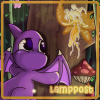
April 19, 201412 yr My Elephante, Mina, is in the Beauty Contest for the first time. I haven't had a lot of experience with drawing (digitally or by hand) but I gave it my best shot. I'd appreciate any votes you can spare! http://www.neopets.com/beauty/details.phtml?pet=Mina1021
April 19, 201412 yr Congrats on making it in...cute picture of Mina! ~Your vote has been cast for Mina1021~ Good luck! :P
April 19, 201412 yr You have my vote Lamppost! Good luck in contest! :D You did a great job drawing your Elephante. :)
April 21, 201412 yr Author Thank you all for the votes! I'm glad you liked my drawing. It took a lot longer than I expected. I had to keep drawing, undoing, and redrawing until I had something that looked good. The eyes were pretty tricky for me. I'm hoping she wins a trophy! Edit: She won! First place for Elephantes. Thank you to everyone who helped make it possible! :happydance: Edited April 26, 201412 yr by Lamppost
Join the conversation
You can post now and register later. If you have an account, sign in now to post with your account.