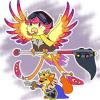
June 12, 201412 yr Author It already did :D About 3 hours on the Microsoft Surface Pro, while really bored in a meeting.
June 12, 201412 yr Woe, awesome drawing! :) You've got a lot of talent. I also really like your user look-up design!
June 12, 201412 yr Wow! I'm jealous! You have such a talent! I wish I could draw, but I'm more of a text and words person. You only did it in 3 hours? That's impressive! I love the wings too, but overall, it's a really cute, intricate work of art!
June 12, 201412 yr Congratulations! :D That drawing is really nice, I especially love how the colours work together. :)
June 12, 201412 yr Wouhou! Congratulations ;3 Lovely drawing o; I like how the pet and his petpet work as a team ;3
June 12, 201412 yr awww, that's adorable!! :D congratulations on getting in, I love seeing pets drawn with their petpets ^^
June 12, 201412 yr Author Thanks all - this was actually done during the Coincidence hoo-hah, but never got accepted until now. Only found out when someone sent me a Neomail saying they liked it xD
Join the conversation
You can post now and register later. If you have an account, sign in now to post with your account.