Skip to content
View in the app

A better way to browse. Learn more.

The Daily Neopets Forums

A full-screen app on your home screen with push notifications, badges and more.

To install this app on iOS and iPadOS
  1. Tap the Share icon in Safari
  2. Scroll the menu and tap Add to Home Screen.
  3. Tap Add in the top-right corner.
To install this app on Android
  1. Tap the 3-dot menu (⋮) in the top-right corner of the browser.
  2. Tap Add to Home screen or Install app.
  3. Confirm by tapping Install.

the_wild_ones

Members
  • Joined

  • Last visited

About Me

I started playing neopets like, 3 years ago? I forgot all about it but I found it in my email XD

Ok, well I'll start introducing myself! I'm from the Philippines (you probably know that place)

I have a pretty long name, but I won't tell it to you. Duh.


I like playing online games but got bored of some of them, but I'm really addicted to Neopets!

I like drawing and anime/mangas. I really like Pokemon but I haven't played Pokemon X/Y...yet.


Ummm... just read the one below and I'm done introducing myself! XD
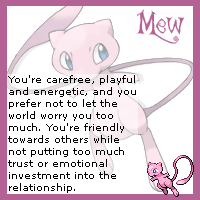
 

mew.gif
I'm not too emotional, lol. XD
teddiursa.gif
Took it a second time and I got this. XD

Account

Navigation

Search

Search

Configure browser push notifications

Chrome (Android)
  1. Tap the lock icon next to the address bar.
  2. Tap Permissions → Notifications.
  3. Adjust your preference.
Chrome (Desktop)
  1. Click the padlock icon in the address bar.
  2. Select Site settings.
  3. Find Notifications and adjust your preference.